#!pip install missingno

import pandas as pd
import numpy as np
import sklearn.impute
import sklearn.linear_model
import matplotlib.pyplot as plt
import missingno as msnoKaggle | 결측치의 처리
python
titanic
impute
Titanic 데이터에는 결측치가 상당히 많았는데, 그것을 처리해서 분석해보자.
1. 라이브러리 imports
2. 데이터 불러오기
#!kaggle competitions download -c titanic
#!unzip titanic.zip -d ./titanic
#df_train = pd.read_csv('titanic/train.csv')
#df_test = pd.read_csv('titanic/test.csv')
#!rm titanic.zip
#!rm -rf titanic/

## 리눅스 서버가 구축되어 있다면 데이터를 바로 불러오기가 편리하다.
df_test = pd.read_csv('./data/test.csv')
df_train = pd.read_csv('./data/train.csv')3. 결측치 확인 및 처리
결측치 확인
df_train.info()<class 'pandas.core.frame.DataFrame'>
RangeIndex: 891 entries, 0 to 890
Data columns (total 12 columns):
# Column Non-Null Count Dtype
--- ------ -------------- -----
0 PassengerId 891 non-null int64
1 Survived 891 non-null int64
2 Pclass 891 non-null int64
3 Name 891 non-null object
4 Sex 891 non-null object
5 Age 714 non-null float64
6 SibSp 891 non-null int64
7 Parch 891 non-null int64
8 Ticket 891 non-null object
9 Fare 891 non-null float64
10 Cabin 204 non-null object
11 Embarked 889 non-null object
dtypes: float64(2), int64(5), object(5)
memory usage: 83.7+ KB시각화
msno.matrix(df_train)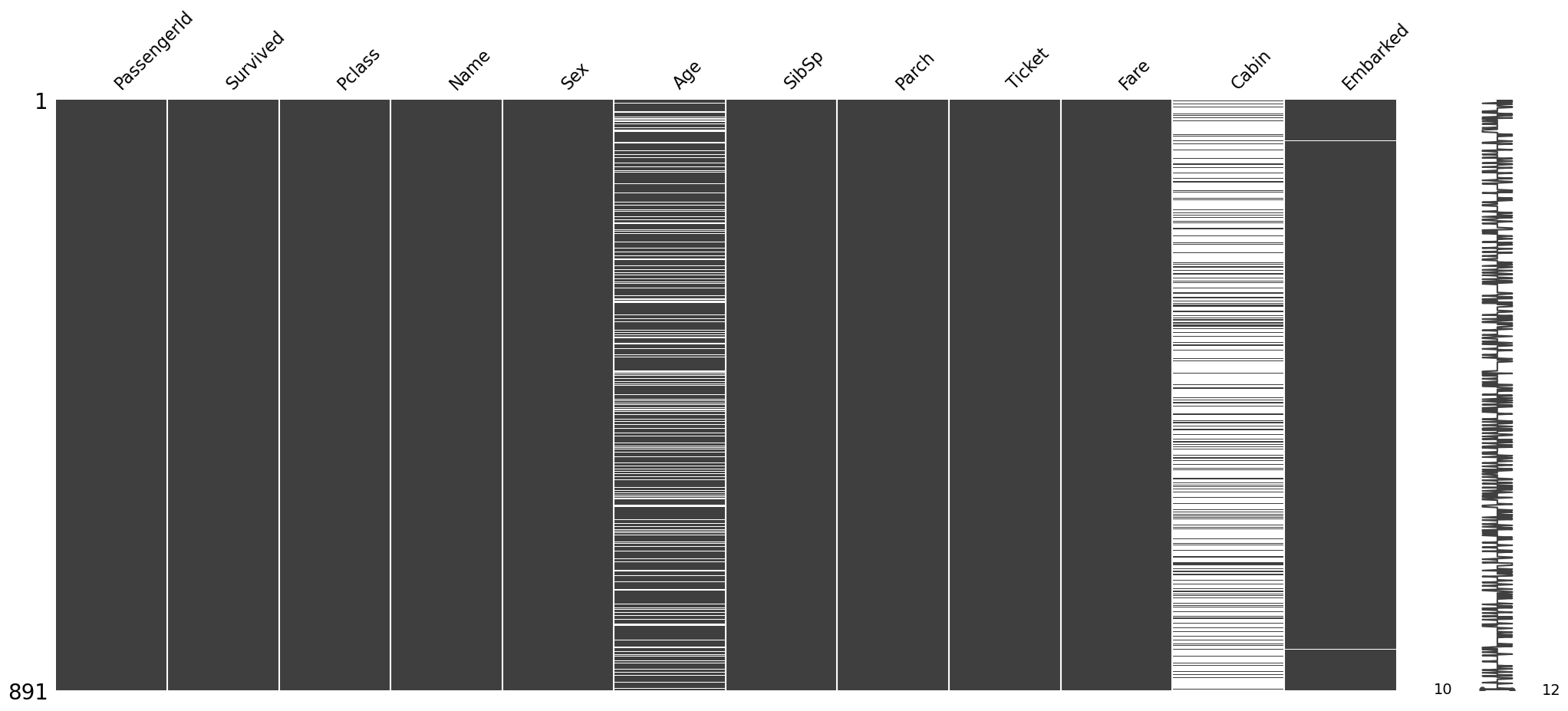
결측치 처리
수치형은 수치형끼리, 범주형은 범주형끼리 처리하자.
df_imputed = df_train.copy()

train_num = df_train.select_dtypes(include = 'number')
train_obj = df_train.select_dtypes(exclude = 'number')

df_imputed[train_num.columns] = sklearn.impute.SimpleImputer(strategy = 'mean').fit_transform(train_num)
df_imputed[train_obj.columns] = sklearn.impute.SimpleImputer(strategy = 'most_frequent')

df_imputed.info()
<class 'pandas.core.frame.DataFrame'>
RangeIndex: 891 entries, 0 to 890
Data columns (total 12 columns):
# Column Non-Null Count Dtype
--- ------ -------------- -----
0 PassengerId 891 non-null float64
1 Survived 891 non-null float64
2 Pclass 891 non-null float64
3 Name 891 non-null object
4 Sex 891 non-null object
5 Age 891 non-null float64
6 SibSp 891 non-null float64
7 Parch 891 non-null float64
8 Ticket 891 non-null object
9 Fare 891 non-null float64
10 Cabin 891 non-null object
11 Embarked 891 non-null object
dtypes: float64(7), object(5)
memory usage: 83.7+ KB결측치가 완전히 메꿔진 것을 확인할 수 있다.
4. 분석(?)
늘 해왔던 것처럼…
set(df_train.columns) - set(df_test.columns){'Survived'}
Survived: 반응변수
- 근데 몇 번 결측치 처리를 반복해야 하므로 위에서의 과정을 함수로 만들어버리자.
def impute_missing(df):
    """
    imputing missing and output whole dataframe

    df : DataFrame include NaN value
    """
    df_ = df.copy()  ## 데이터를 복사

    df_num = df_.select_dtypes(include = 'number')  ## 해당하는 데이터 타입만 선택
    df_obj = df_.select_dtypes(exclude = 'number')

    df_[df_num.columns] = sklearn.impute.SimpleImputer(strategy = 'mean').fit_transform(df_num)
    df_[df_obj.columns] = sklearn.impute.SimpleImputer(strategy = 'most_frequent').fit_transform(df_obj)

return df_pd.get_dummies(impute_missing(df_train.drop(['Survived'], axis = 1)))| PassengerId | Pclass | Age | SibSp | Parch | Fare | Name_Abbing, Mr. Anthony | Name_Abbott, Mr. Rossmore Edward | Name_Abbott, Mrs. Stanton (Rosa Hunt) | Name_Abelson, Mr. Samuel | ... | Cabin_F G73 | Cabin_F2 | Cabin_F33 | Cabin_F38 | Cabin_F4 | Cabin_G6 | Cabin_T | Embarked_C | Embarked_Q | Embarked_S | |
|---|---|---|---|---|---|---|---|---|---|---|---|---|---|---|---|---|---|---|---|---|---|
| 0 | 1.0 | 3.0 | 22.000000 | 1.0 | 0.0 | 7.2500 | False | False | False | False | ... | False | False | False | False | False | False | False | False | False | True |
| 1 | 2.0 | 1.0 | 38.000000 | 1.0 | 0.0 | 71.2833 | False | False | False | False | ... | False | False | False | False | False | False | False | True | False | False |
| 2 | 3.0 | 3.0 | 26.000000 | 0.0 | 0.0 | 7.9250 | False | False | False | False | ... | False | False | False | False | False | False | False | False | False | True |
| 3 | 4.0 | 1.0 | 35.000000 | 1.0 | 0.0 | 53.1000 | False | False | False | False | ... | False | False | False | False | False | False | False | False | False | True |
| 4 | 5.0 | 3.0 | 35.000000 | 0.0 | 0.0 | 8.0500 | False | False | False | False | ... | False | False | False | False | False | False | False | False | False | True |
| ... | ... | ... | ... | ... | ... | ... | ... | ... | ... | ... | ... | ... | ... | ... | ... | ... | ... | ... | ... | ... | ... |
| 886 | 887.0 | 2.0 | 27.000000 | 0.0 | 0.0 | 13.0000 | False | False | False | False | ... | False | False | False | False | False | False | False | False | False | True |
| 887 | 888.0 | 1.0 | 19.000000 | 0.0 | 0.0 | 30.0000 | False | False | False | False | ... | False | False | False | False | False | False | False | False | False | True |
| 888 | 889.0 | 3.0 | 29.699118 | 1.0 | 2.0 | 23.4500 | False | False | False | False | ... | False | False | False | False | False | False | False | False | False | True |
| 889 | 890.0 | 1.0 | 26.000000 | 0.0 | 0.0 | 30.0000 | False | False | False | False | ... | False | False | False | False | False | False | False | True | False | False |
| 890 | 891.0 | 3.0 | 32.000000 | 0.0 | 0.0 | 7.7500 | False | False | False | False | ... | False | False | False | False | False | False | False | False | True | False |
891 rows × 1730 columns
늘 그랬던 것처럼 get_dummies를 해줬는데… 뭔가 이상하다.
pd.get_dummies(impute_missing(df_train.drop(['Survived'], axis = 1))).shape(891, 1730)행이 1730개??? > 이러한 상황에서는 선형 모델이 제대로 작동하지 않는다…!
# step 1
X = pd.get_dummies(impute_missing(df_train.drop(['Survived'], axis = 1)))
y = df_train.Survived
XX = pd.get_dummies(impute_missing(df_test))

# step 2
predictr = sklearn.linear_model.LogisticRegression()

# step 3
predictr.fit(X, y)

# step 4
predictr.predict(XX)
C:\Users\hollyriver\anaconda3\Lib\site-packages\sklearn\linear_model\_logistic.py:460: ConvergenceWarning: lbfgs failed to converge (status=1):
STOP: TOTAL NO. of ITERATIONS REACHED LIMIT.
Increase the number of iterations (max_iter) or scale the data as shown in:
https://scikit-learn.org/stable/modules/preprocessing.html
Please also refer to the documentation for alternative solver options:
https://scikit-learn.org/stable/modules/linear_model.html#logistic-regression
n_iter_i = _check_optimize_result(ValueError: The feature names should match those that were passed during fit.
Feature names unseen at fit time:
- Cabin_A11
- Cabin_A18
- Cabin_A21
- Cabin_A29
- Cabin_A9
- ...
Feature names seen at fit time, yet now missing:
- Cabin_A10
- Cabin_A14
- Cabin_A16
- Cabin_A19
- Cabin_A20
- ...{c:len(set(df_train[c])) for c in df_train.select_dtypes(include="object").columns}{'Name': 891, 'Sex': 2, 'Ticket': 681, 'Cabin': 148, 'Embarked': 4}- 형식이 object인 것들이 가지고 있는 유니크한 값들이 몇개인지를 딕셔너리 컴프리헨션 해봤다.
사실상 해당 수가 엄청나게 많은 Name, Ticket, Cabin의 경우 없애는 편이 더 좋아보인다.
5. 진짜 분석
## step 1
X = pd.get_dummies(impute_missing(df_train).drop(['Name', 'Ticket', 'Cabin', 'Survived'], axis = 1))
y = df_train.Survived
XX = pd.get_dummies(impute_missing(df_test).drop(['Name', 'Ticket', 'Cabin'], axis = 1))

## step 2
predictr = sklearn.linear_model.LogisticRegression()

## step 3
predictr.fit(X, y)

## step 4
df_test[['PassengerId']].assign(Survived = predictr.predict(XX))
C:\Users\hollyriver\anaconda3\envs\py\lib\site-packages\sklearn\linear_model\_logistic.py:460: ConvergenceWarning: lbfgs failed to converge (status=1):
STOP: TOTAL NO. of ITERATIONS REACHED LIMIT.
Increase the number of iterations (max_iter) or scale the data as shown in:
https://scikit-learn.org/stable/modules/preprocessing.html
Please also refer to the documentation for alternative solver options:
https://scikit-learn.org/stable/modules/linear_model.html#logistic-regression
n_iter_i = _check_optimize_result(| PassengerId | Survived | |
|---|---|---|
| 0 | 892 | 0 |
| 1 | 893 | 1 |
| 2 | 894 | 0 |
| 3 | 895 | 0 |
| 4 | 896 | 1 |
| ... | ... | ... |
| 413 | 1305 | 0 |
| 414 | 1306 | 1 |
| 415 | 1307 | 0 |
| 416 | 1308 | 0 |
| 417 | 1309 | 0 |
418 rows × 2 columns
df_test[['PassengerId']].assign(Survived = predictr.predict(XX)).to_csv("submission", index = False)이렇게 하면 된다.